CCNA VLANs and Trunking: Free Practice Questions + Study Guide
In This Guide
What are VLANs?
A Virtual Local Area Network (VLAN) is a logical segmentation of a physical switch into multiple, independent broadcast domains. Without VLANs, every port on a switch belongs to the same broadcast domain, meaning a broadcast frame from any device reaches every other device on the switch. VLANs solve this by allowing you to group ports together regardless of their physical location.
Think of VLANs as virtual switches inside a physical switch. Devices in VLAN 10 can only communicate at Layer 2 with other devices in VLAN 10 - they cannot reach devices in VLAN 20 without a Layer 3 device (router or Layer 3 switch) to route between them.
Why VLANs matter in real networks:
- Broadcast control - limits broadcast traffic to a single VLAN, reducing unnecessary processing on hosts
- Security - isolates sensitive traffic (e.g., management, finance) from general user traffic without separate physical infrastructure
- Flexibility - groups users by function or department regardless of physical switch port location
- Performance - smaller broadcast domains mean less wasted bandwidth and faster convergence
- Simplified management - policies and ACLs can be applied per VLAN rather than per port
Cisco switches support VLANs 1 through 4094. VLAN 1 is the default VLAN - all ports belong to VLAN 1 out of the box. VLANs 1002-1005 are reserved for legacy Token Ring and FDDI, and VLANs in the extended range (1006-4094) require VTP transparent mode or VTP version 3.
Access Ports vs Trunk Ports
Switch ports operate in one of two fundamental modes: access or trunk. Understanding the difference is essential for CCNA success and real-world network design.
| Feature | Access Port | Trunk Port |
|---|---|---|
| VLAN membership | Single VLAN only | Multiple VLANs simultaneously |
| Tagging | Sends/receives untagged frames | Tags frames with 802.1Q header |
| Typical connection | End devices (PCs, printers, phones) | Switch-to-switch, switch-to-router |
| Native VLAN | Not applicable | Untagged VLAN (default: VLAN 1) |
802.1Q is the IEEE standard for VLAN tagging on trunk links. When a frame enters a trunk port, the switch inserts a 4-byte 802.1Q tag into the Ethernet header. This tag contains a 12-bit VLAN ID field, which is how the receiving switch knows which VLAN the frame belongs to.
When a trunk port receives an untagged frame, it places that frame into the native VLAN. When it receives a tagged frame, it forwards it to the VLAN indicated in the 802.1Q header. This behavior is critical for understanding trunk troubleshooting scenarios on the CCNA exam.
VLAN Configuration
Here is how to create VLANs and assign ports on a Cisco switch:
! Enter global configuration mode
configure terminal

! Create VLANs and give them descriptive names
vlan 10
 name SALES
vlan 20
 name ENGINEERING
vlan 30
name MANAGEMENT! Assign interface to a single VLAN as an access port
interface GigabitEthernet0/1
switchport mode access
switchport access vlan 10
switchport nonegotiate! Configure interface as an 802.1Q trunk
interface GigabitEthernet0/24
switchport trunk encapsulation dot1q
switchport mode trunk
switchport trunk allowed vlan 10,20,30
switchport trunk native vlan 99
switchport nonegotiateKey configuration details:
switchport mode access- forces the port into access mode (single VLAN)switchport access vlan 10- assigns the access port to VLAN 10switchport mode trunk- forces the port into trunk mode (carries multiple VLANs)switchport trunk allowed vlan- restricts which VLANs are permitted on the trunk (security best practice)switchport trunk native vlan 99- changes the native VLAN from default (VLAN 1) to VLAN 99switchport nonegotiate- disables DTP negotiation, preventing unauthorized trunk formation
switchport mode access on end-user ports and limit allowed VLANs on trunks. This prevents VLAN hopping attacks where an attacker exploits DTP to form a trunk and access traffic from other VLANs.Useful verification commands:
show vlan brief                    ! List all VLANs and their assigned ports
show interfaces trunk              ! View trunk port status, native VLAN, allowed VLANs
show interfaces switchport         ! View detailed switchport configuration
show interfaces Gi0/1 switchport   ! View specific port mode and VLAN assignment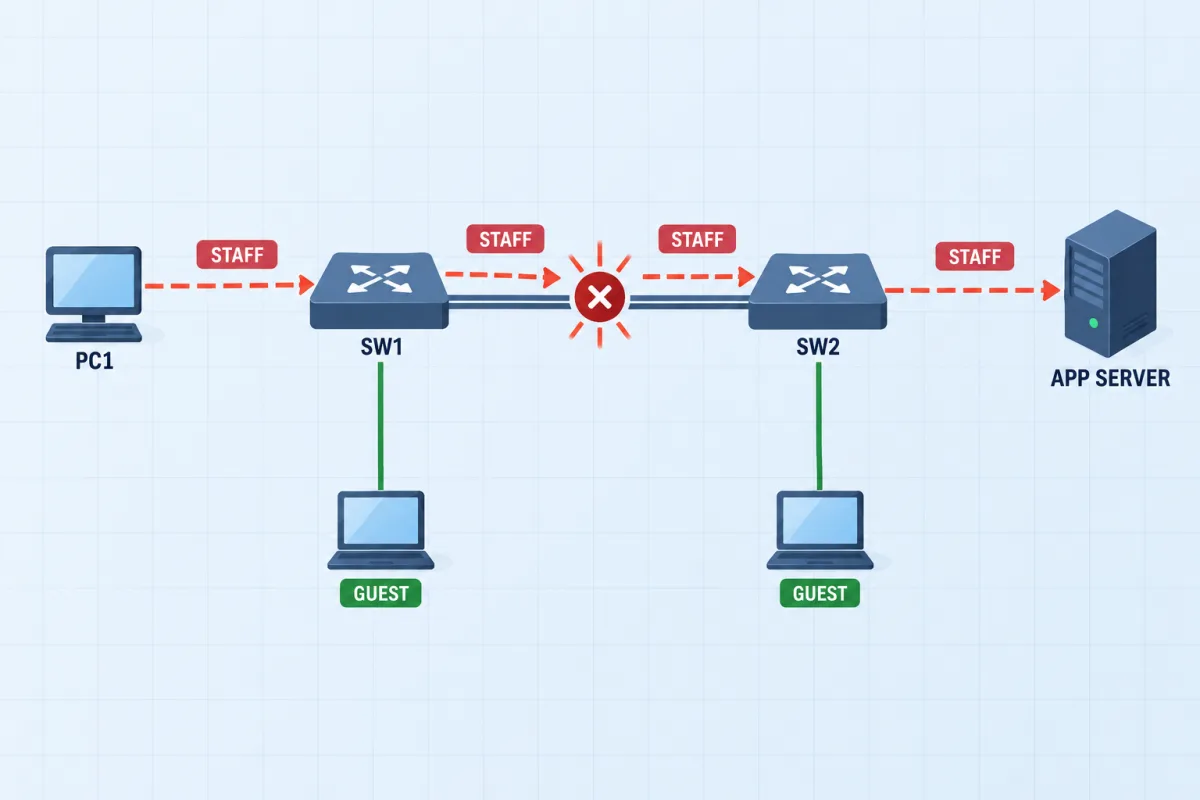
Campus VLAN: Restore the Uplink
An application server is unreachable across two access switches. Restore the staff VLAN without connecting the isolated guest segment - access ports, the trunk and its allowed VLANs are all in play.
See all 9 CCNA advanced labsInter-VLAN Routing
Because VLANs create separate broadcast domains, devices in different VLANs cannot communicate at Layer 2. To route traffic between VLANs, you need a Layer 3 device. There are two primary methods tested on the CCNA exam:
Method 1: Router-on-a-Stick
A single router interface connects to the switch via a trunk link. The router creates subinterfaces - one for each VLAN - each configured with 802.1Q encapsulation and an IP address serving as the default gateway for that VLAN.
! Router configuration
interface GigabitEthernet0/0
 no shutdown

! Subinterface for VLAN 10
interface GigabitEthernet0/0.10
 encapsulation dot1Q 10
 ip address 192.168.10.1 255.255.255.0

! Subinterface for VLAN 20
interface GigabitEthernet0/0.20
 encapsulation dot1Q 20
 ip address 192.168.20.1 255.255.255.0

! Subinterface for native VLAN 99
interface GigabitEthernet0/0.99
 encapsulation dot1Q 99 native
ip address 192.168.99.1 255.255.255.0.10) does not have to match the VLAN number, but it is strongly recommended to match them for clarity. The VLAN association comes from the encapsulation dot1Q <vlan-id> command, not the subinterface number.Method 2: SVI (Layer 3 Switch)
A Switch Virtual Interface (SVI) is a virtual Layer 3 interface on a multilayer switch. Instead of routing through an external router, the switch itself performs inter-VLAN routing at hardware speed.
! Enable IP routing on the Layer 3 switch
ip routing

! Create SVIs for each VLAN
interface vlan 10
 ip address 192.168.10.1 255.255.255.0
 no shutdown

interface vlan 20
 ip address 192.168.20.1 255.255.255.0
 no shutdown
SVI-based routing is the preferred method in modern networks because it offers wire-speed routing through hardware ASICs, avoids the bandwidth bottleneck of router-on-a-stick, and simplifies the topology by eliminating the need for an external router.
DTP and VTP
Dynamic Trunking Protocol (DTP)
DTP is a Cisco proprietary protocol that automatically negotiates trunk links between switches. While it simplifies initial setup, DTP is generally disabled in production networks for security reasons.
| DTP Mode | Behavior | Forms Trunk With |
|---|---|---|
| dynamic auto | Passively waits to be asked to trunk | trunk, dynamic desirable |
| dynamic desirable | Actively tries to negotiate a trunk | trunk, dynamic desirable, dynamic auto |
| trunk | Forces trunk mode unconditionally | trunk, dynamic desirable, dynamic auto |
| access | Forces access mode unconditionally | Never forms a trunk |
dynamic auto will not form a trunk - both are waiting for the other to initiate. Use switchport nonegotiate to disable DTP entirely on trunk and access ports as a security best practice.VLAN Trunking Protocol (VTP)
VTP is a Cisco proprietary protocol that synchronizes VLAN databases across switches in the same VTP domain. It reduces manual VLAN configuration effort but can be dangerous if misconfigured.
| VTP Mode | Create/Delete VLANs? | Forwards VTP Ads? | Syncs from Server? |
|---|---|---|---|
| Server (default) | Yes | Yes | Yes |
| Client | No | Yes | Yes |
| Transparent | Yes (local only) | Yes (pass-through) | No |
Get the Complete CCNA Study Guide
When you purchase a CCNA practice exam, you get full access to our comprehensive study guides covering every exam topic in depth - not just the free samples here.
Want to go deeper?
CCNA VLANs and Trunking Practice Questions
Test your understanding with these 5 expert-created questions. Each includes a detailed explanation to reinforce your learning.
Ready for More?
You've just covered VLANs and Trunking. Here's how to keep preparing for your CCNA:
Frequently Asked Questions
Are VLANs covered on the CCNA exam?
Yes, VLANs are a foundational topic on the CCNA 200-301 exam. They fall under the "Network Access" domain, which accounts for approximately 20% of the exam. You need to understand VLAN creation, access and trunk port configuration, 802.1Q tagging, native VLANs, inter-VLAN routing, and protocols like DTP and VTP.
What is the difference between an access port and a trunk port?
An access port belongs to a single VLAN and carries untagged traffic for that VLAN only - typically connecting end devices like PCs and printers. A trunk port carries traffic for multiple VLANs simultaneously using 802.1Q tagging. Trunk ports are used for switch-to-switch and switch-to-router links where traffic from multiple VLANs needs to traverse a single physical connection.
What is the native VLAN and why is it important?
The native VLAN is the VLAN whose traffic is sent untagged across an 802.1Q trunk link. By default, this is VLAN 1. It is important because a native VLAN mismatch between two trunk endpoints can cause traffic to leak between VLANs, creating connectivity issues and security vulnerabilities. Cisco best practice is to change the native VLAN from the default VLAN 1 to an unused VLAN and ensure it matches on both sides of every trunk.
How does inter-VLAN routing work?
Since VLANs create separate broadcast domains, a Layer 3 device (router or Layer 3 switch) is required for traffic to pass between VLANs. The two most common methods are: (1) Router-on-a-stick, where a router connects to the switch via a single trunk link and uses subinterfaces (one per VLAN) with 802.1Q encapsulation; and (2) SVI-based routing on a Layer 3 switch, where Switch Virtual Interfaces are created for each VLAN and IP routing is enabled on the switch itself. SVI-based routing is generally preferred for performance.