CCNA OSPF Configuration: Free Practice Questions + Study Guide
In This Guide
What is OSPF?
Open Shortest Path First (OSPF) is a link-state routing protocol used in large enterprise networks. Unlike distance-vector protocols like RIP, OSPF builds a complete map of the network topology (the Link-State Database or LSDB) and uses Dijkstra's Shortest Path First (SPF) algorithm to calculate the best path to every destination.
OSPF is an interior gateway protocol (IGP) defined in RFC 2328. It's the most widely deployed IGP in enterprise networks and a critical topic on the CCNA 200-301 exam.
Key characteristics of OSPF:
- Link-state protocol - routers share link-state advertisements (LSAs) to build a complete topology map
- Uses SPF algorithm - calculates the shortest path tree from the LSDB
- Hierarchical design - uses areas to reduce LSDB size and SPF computation
- Fast convergence - detects changes quickly and recalculates routes
- Classless - supports VLSM and CIDR
- Administrative distance of 110 - lower than IS-IS (115) but higher than EIGRP (90)
OSPF Area Types
OSPF uses a hierarchical design with areas to scale efficiently. All areas must connect to the backbone area (Area 0). Here are the key area types you need to know:
| Area Type | Allows External LSAs? | Default Route? | Use Case |
|---|---|---|---|
| Backbone (Area 0) | Yes | No (not automatic) | Central area connecting all others |
| Normal Area | Yes | No | Standard non-backbone area |
| Stub Area | No (blocks Type 5) | Yes (injected by ABR) | Areas with single exit point |
| Totally Stubby Area | No (blocks Type 3, 4, 5) | Yes | Maximum LSDB reduction |
| NSSA | No Type 5 (uses Type 7) | Optional | Stub area that needs limited external routes |
OSPF Neighbor Adjacency & States
Before OSPF routers can exchange routing information, they must form a neighbor adjacency. OSPF neighbors go through several states before becoming fully adjacent:
- Down - No Hello packets received from neighbor
- Init - Hello received but own Router ID not seen in neighbor's Hello
- 2-Way - Bidirectional communication established; DR/BDR election occurs here
- ExStart - Master/Slave relationship established for DBD exchange
- Exchange - DBD (Database Description) packets exchanged
- Loading - LSR/LSU packets exchanged for missing LSAs
- Full - LSDBs synchronized; routers are fully adjacent
Use show ip ospf neighbor to verify neighbor states. The most common states you'll see in a healthy network are FULL (on point-to-point and DR/BDR relationships) and 2-WAY (between DROther routers on multi-access networks).
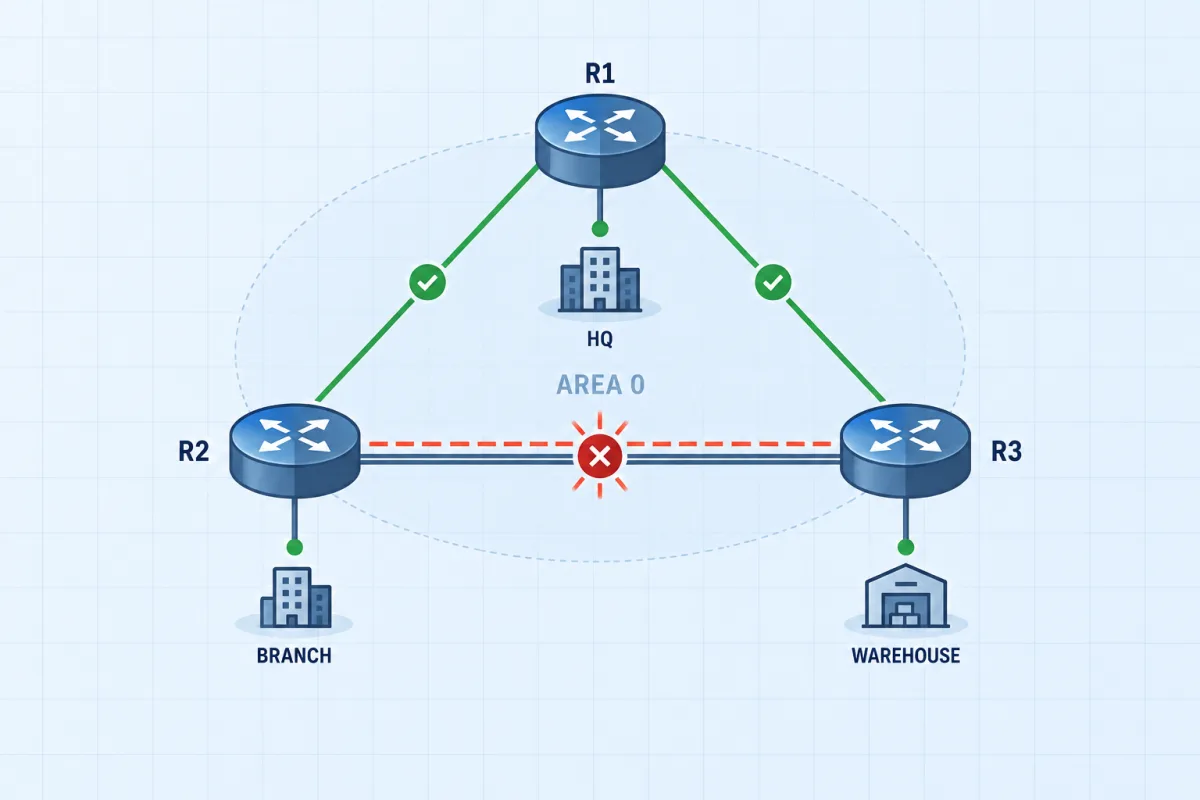
Three Sites on OSPF
Head office, branch and warehouse share one area, and one site has dropped out of the routing domain. The neighbor states above are what you will be reading: find why the adjacency will not form and bring the site back.
See all 9 CCNA advanced labsDR/BDR Election Process
On multi-access networks (like Ethernet), OSPF elects a Designated Router (DR) and Backup Designated Router (BDR) to reduce the number of adjacencies and LSA flooding.
The election process works as follows:
- Router with the highest OSPF priority becomes DR (default priority = 1)
- If priorities are equal, the router with the highest Router ID wins
- Second highest becomes BDR
- All other routers become DROther
- Setting priority to 0 prevents a router from participating in the election
Configure OSPF priority on an interface:
interface GigabitEthernet0/0
 ip ospf priority 200
OSPF Configuration Commands
Here's how to configure basic single-area OSPF on a Cisco router:
! Enable OSPF process (process ID is locally significant)
router ospf 1

! Advertise networks into OSPF Area 0
network 10.1.1.0 0.0.0.255 area 0
network 10.1.2.0 0.0.0.255 area 0

! Set Router ID explicitly (recommended)
router-id 1.1.1.1

! Prevent OSPF on interfaces facing end devices
passive-interface GigabitEthernet0/2

! Set reference bandwidth to match modern links
auto-cost reference-bandwidth 10000
Key points about OSPF configuration:
- The process ID (e.g.,
router ospf 1) is locally significant - it doesn't need to match between neighbors - The network command uses a wildcard mask (inverse of subnet mask)
- passive-interface suppresses OSPF Hello packets on that interface but still advertises the network
- router-id should be set explicitly; otherwise OSPF uses the highest loopback IP, then highest physical IP
Useful verification commands:
show ip ospf neighbor          ! View neighbor table and states
show ip route ospf             ! View OSPF-learned routes
show ip ospf interface brief   ! View OSPF-enabled interfaces
show ip ospf database          ! View the LSDB
OSPF Cost & Path Selection
OSPF uses cost as its metric. The cost is calculated as:
Cost = Reference Bandwidth / Interface BandwidthDefault reference bandwidth = 100 Mbps. Minimum cost = 1.
| Interface | Bandwidth | Default Cost | Cost (ref=10000) |
|---|---|---|---|
| FastEthernet | 100 Mbps | 1 | 100 |
| GigabitEthernet | 1 Gbps | 1 | 10 |
| 10 GigabitEthernet | 10 Gbps | 1 | 1 |
auto-cost reference-bandwidth 10000 or higher on all routers.OSPF selects the path with the lowest total cost from source to destination. The total cost is the sum of all outgoing interface costs along the path.
Get the Complete CCNA Study Guide
When you purchase a CCNA practice exam, you get full access to our comprehensive study guides covering every exam topic in depth - not just the free samples here.
Want to go deeper?
CCNA OSPF Practice Questions
Test your understanding with these 5 expert-created questions. Each includes a detailed explanation to reinforce your learning.
Ready for More?
You've just covered OSPF Configuration. Here's how to keep preparing for your CCNA:
Frequently Asked Questions
Is OSPF covered on the CCNA 200-301 exam?
Yes, OSPF is a major topic on the CCNA 200-301 exam. It falls under the "IP Routing" domain, which represents approximately 25% of the exam. You need to understand single-area and multi-area OSPF concepts, configuration, neighbor adjacencies, and troubleshooting.
What is the difference between OSPFv2 and OSPFv3?
OSPFv2 is used for IPv4 routing, while OSPFv3 was originally designed for IPv6 but now supports both IPv4 and IPv6 (with address families). OSPFv3 uses link-local addresses for neighbor communication and includes changes to LSA types. The CCNA exam primarily focuses on OSPFv2 for single-area configurations.
How many OSPF questions appear on the CCNA exam?
While Cisco doesn't disclose exact question counts per topic, OSPF is part of the IP Routing domain (25% of the exam). Expect approximately 5-10 questions related to OSPF concepts and configuration across the 100-120 question exam.
What OSPF concepts should I focus on for CCNA?
For CCNA, focus on: single-area OSPF configuration (router ospf, network command), OSPF neighbor adjacencies and states, DR/BDR election process, OSPF cost and path selection, basic multi-area concepts (area types, ABR), and OSPF troubleshooting (show ip ospf neighbor, show ip route ospf).