CCNA Spanning Tree Protocol: Free Practice Questions + Study Guide
In This Guide
What is Spanning Tree Protocol?
Spanning Tree Protocol (STP) is a Layer 2 protocol defined in IEEE 802.1D that prevents switching loops in networks with redundant paths. Without STP, frames would circulate endlessly between switches, causing broadcast storms, MAC address table instability, and ultimately a complete network outage.
STP works by electing a root bridge and then calculating the shortest loop-free path from every other switch to that root. Any redundant links that would create a loop are placed in a blocking state, effectively disabling them for data traffic while keeping them available as backups.
Switches communicate STP information using Bridge Protocol Data Units (BPDUs). BPDUs carry the sending switch's Bridge ID (priority + MAC address), the root bridge's Bridge ID, and the cost to reach the root. Each switch compares received BPDUs against its own to determine the best path to the root bridge.
Key problems STP prevents:
- Broadcast storms - frames loop indefinitely, consuming all bandwidth
- MAC address table instability - the switch learns the same MAC on different ports as frames circle back
- Duplicate frame delivery - hosts receive multiple copies of the same unicast frame
STP Port States and Roles
Every switch port running STP is assigned both a role (what the port does in the topology) and a state (what the port is currently allowed to do with frames).
STP Port Roles
- Root Port - the port with the lowest cost path to the root bridge (one per non-root switch)
- Designated Port - the port on each network segment that forwards traffic toward the root bridge (one per segment); all ports on the root bridge are designated
- Blocking (Non-Designated) Port - a port that would create a loop if active; it receives BPDUs but does not forward data frames
Classic STP Port States (802.1D)
In classic STP, ports transition through these states before forwarding traffic:
| State | Learns MACs? | Forwards Data? | Duration |
|---|---|---|---|
| Blocking | No | No | 20s (Max Age) |
| Listening | No | No | 15s (Forward Delay) |
| Learning | Yes | No | 15s (Forward Delay) |
| Forwarding | Yes | Yes | Stable state |
| Disabled | No | No | Administratively shut down |
RSTP Port Roles (802.1w)
RSTP introduces two additional port roles that enable faster convergence:
- Alternate Port - a backup path to the root bridge; can rapidly take over if the root port fails (replaces the classic blocking port role)
- Backup Port - a redundant path to a segment where the switch already has a designated port (rare, typically seen with hubs)
Root Bridge Election
The root bridge is the central reference point of the spanning tree. All traffic paths are calculated relative to the root bridge, making its placement critical for optimal network performance.
The election process works as follows:
- Every switch starts by assuming it is the root bridge and sends BPDUs with its own Bridge ID
- The Bridge ID consists of a priority value (default 32768) and the switch's MAC address
- The switch with the lowest Bridge ID becomes the root bridge
- Priority is compared first - lower priority wins
- If priorities are equal, the lowest MAC address is the tiebreaker
- Once a switch recognizes a superior BPDU, it stops claiming to be root and relays the superior BPDU
Configure the root bridge priority:
! Set priority explicitly (must be a multiple of 4096)
spanning-tree vlan 1 priority 4096

! Or use the macro command (sets priority to 24576 or 4096 lower than current root)
spanning-tree vlan 1 root primary

! Set a backup root bridge (sets priority to 28672)
spanning-tree vlan 1 root secondary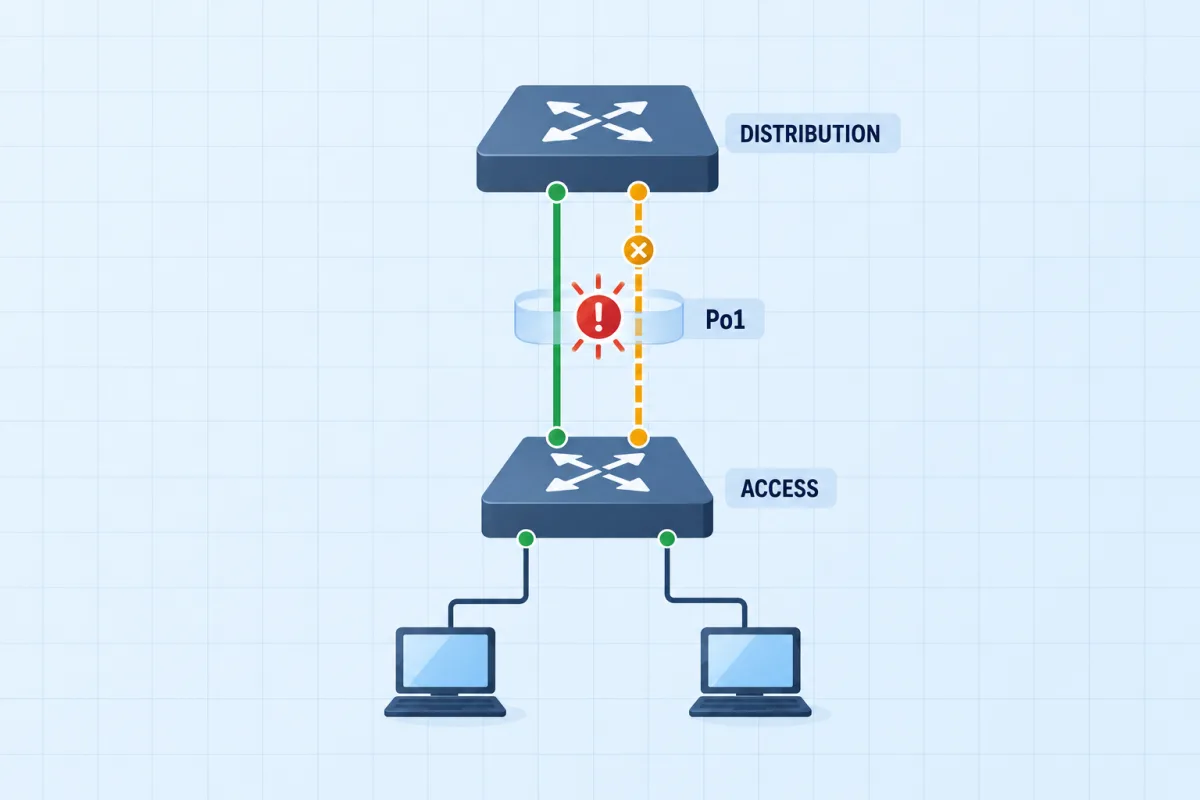
Bundle the Access Uplink
Two uplinks were meant to run as one 2 Gbps bundle. The channel has not formed, so spanning tree blocks one of them. Read show spanning-tree and show etherchannel summary, fix the channel, and the network grades it.
STP vs RSTP vs MSTP
The IEEE has released several versions of the spanning tree standard. Understanding the differences between them is essential for the CCNA exam.
| Feature | STP (802.1D) | RSTP (802.1w) | MSTP (802.1s) |
|---|---|---|---|
| Convergence Time | 30-50 seconds | Less than 6 seconds | Less than 6 seconds |
| Port States | 5 (Blocking, Listening, Learning, Forwarding, Disabled) | 3 (Discarding, Learning, Forwarding) | 3 (same as RSTP) |
| Port Roles | Root, Designated, Blocking | Root, Designated, Alternate, Backup | Same as RSTP |
| BPDU Handling | Only root bridge generates BPDUs | All switches generate BPDUs every 2 seconds | Same as RSTP |
| Topology Change | TCN BPDU sent toward root | TC bit set directly; faster MAC flushing | TC scoped to affected instance |
| VLAN Support | One tree for all VLANs (CST) | One tree for all VLANs (or per-VLAN with RPVST+) | Multiple VLANs mapped to instances |
RSTP achieves faster convergence through several key improvements:
- Proposal/Agreement mechanism - ports negotiate directly with neighbors instead of waiting for timers
- Alternate and Backup port roles - pre-computed failover paths for immediate switchover
- Edge ports - equivalent to PortFast, immediately transition to forwarding
- All switches send BPDUs - a switch detects neighbor failure in 3 missed BPDUs (6 seconds) instead of waiting for Max Age (20 seconds)
STP Configuration & Best Practices
Proper STP configuration is critical for network stability. Here are the essential commands and features you should know for the CCNA exam:
PortFast
PortFast allows a port to skip the listening and learning states and transition immediately to forwarding. It should only be used on access ports connected to end devices.
! Enable PortFast on a specific interface
interface GigabitEthernet0/1
 spanning-tree portfast

! Enable PortFast globally on all access ports
spanning-tree portfast default
BPDU Guard
BPDU Guard disables a port (err-disabled) if it receives a BPDU. This protects the STP topology from rogue switches connected to access ports.
! Enable BPDU Guard on a specific interface
interface GigabitEthernet0/1
 spanning-tree bpduguard enable

! Enable BPDU Guard globally on all PortFast-enabled ports
spanning-tree portfast bpduguard default
Root Guard
Root Guard prevents a port from becoming a root port. If a superior BPDU is received on a Root Guard-enabled port, the port is placed into a root-inconsistent state (blocking). This protects against an unauthorized switch becoming the root bridge.
interface GigabitEthernet0/1
spanning-tree guard rootspanning-tree vlan root primary on your core switches.Useful verification commands:
show spanning-tree                    ! View STP status for all VLANs
show spanning-tree vlan 1             ! View STP for a specific VLAN
show spanning-tree interface Gi0/1    ! View STP status on an interface
show spanning-tree summary            ! View summary of STP port states
show spanning-tree root ! View root bridge informationGet the Complete CCNA Study Guide
When you purchase a CCNA practice exam, you get full access to our comprehensive study guides covering every exam topic in depth - not just the free samples here.
Want to go deeper?
CCNA Spanning Tree Protocol Practice Questions
Test your understanding with these 5 expert-created questions. Each includes a detailed explanation to reinforce your learning.
Ready for More?
You've just covered Spanning Tree Protocol. Here's how to keep preparing for your CCNA:
Frequently Asked Questions
Is STP covered on the CCNA 200-301 exam?
Yes, Spanning Tree Protocol is a significant topic on the CCNA 200-301 exam. It falls under the "Network Access" domain, which accounts for approximately 20% of the exam. You need to understand STP and RSTP concepts, root bridge election, port states and roles, PortFast, and related Layer 2 protection mechanisms like BPDU Guard.
What is the difference between STP, RSTP, and MSTP?
STP (802.1D) is the original standard with convergence times of 30-50 seconds. RSTP (802.1w) is an evolution that reduces convergence to under 6 seconds by introducing new port roles (alternate, backup) and using proposal/agreement mechanisms instead of timers. MSTP (802.1s) extends RSTP by allowing multiple VLANs to be mapped to a single spanning-tree instance, reducing the CPU and memory overhead of running a separate tree per VLAN.
How does the root bridge election work?
Every switch in a spanning-tree domain sends BPDUs containing its Bridge ID, which consists of a priority value (default 32768) plus the switch's MAC address. The switch with the lowest Bridge ID becomes the root bridge. Priority is compared first; if priorities are equal, the lowest MAC address wins. Administrators can influence the election by lowering a switch's priority using spanning-tree vlan <id> priority <value> or spanning-tree vlan <id> root primary.
What is PortFast and when should I use it?
PortFast is a Cisco feature that allows a switch port to skip the listening and learning states and transition directly to forwarding. It should only be used on access ports connected to end devices (PCs, printers, servers) - never on ports connecting to other switches. PortFast is commonly paired with BPDU Guard, which disables the port if a BPDU is received, protecting against accidental loops caused by rogue switches.