Why Is the Wrong HSRP Router Active? Priority, Preempt and Tracking
HSRP rarely fails loudly. Hosts keep reaching the internet through the virtual gateway, and nobody notices that the traffic is leaving through the backup router and its slower uplink. Here is how the Active router is really chosen, how to read show standby brief, and the three reasons the wrong router ends up Active.
The short answer: HSRP elects the Active router by priority (default 100, highest wins, ties go to the highest IP address) - but only when there is no Active router already. A router with a higher priority does not take over from a working Active router unless it has standby preempt. So when the wrong router is Active, the intended one has the lower priority, or has no preempt and came up second, or its interface or tracked uplink is down.
The free ENCOR scenario is this exact problem
Two routers, one virtual gateway, and traffic leaving through the backup. Find out why from the console and fix it - the network grades the repair. The same code unlocks a full-length ENCOR practice exam.
CCNP-EXAM-FULL
Open the free scenario
Already have an account? Log in and open it
In This Guide
How HSRP really elects the Active router
- Priority decides - 0 to 255, default 100. Highest wins.
- Ties go to the highest IP address on the HSRP interface.
- Election only happens when there is no Active router. Whoever reaches Active first keeps the role while it is healthy.
- Preempt changes that rule. With
standby <group> preempt, a router that hears a lower-priority Active router takes the role over. Preempt is off by default in HSRP.
Reading show standby brief
Real output from the engine the FigigExams scenarios run on. First, the problem - on R1, the router that should be Active:
R1#show standby brief
                     P indicates configured to preempt.
                     |
Interface   Grp  Pri  P State    Active          Standby         Virtual IP
Gi0/0       1    80   P Standby  192.168.50.3    local           192.168.50.1
R1 runs at priority 80 and sits in Standby; the Active router is 192.168.50.3 (R2). The P column says R1 is configured to preempt - it just has nothing to preempt with.
R2#show standby brief
                     P indicates configured to preempt.
                     |
Interface   Grp  Pri  P State    Active          Standby         Virtual IP
Gi0/0       1    90   P Active   local           192.168.50.2    192.168.50.1
R2 runs at 90 with preempt, so it wins and holds the role. Raise R1 above 90 - and keep preempt on it - and R1 takes over:
R1#show standby brief
                     P indicates configured to preempt.
                     |
Interface   Grp  Pri  P State    Active          Standby         Virtual IP
Gi0/0       1    110  P Active   local           192.168.50.3    192.168.50.1
For the details behind the brief view - timers, the virtual MAC, who the peers are - use show standby:
R1#show standby
GigabitEthernet0/0 - Group 1
  State is Active
  Virtual IP address is 192.168.50.1
  Active virtual MAC address is 0000.0c07.ac01
    Local virtual MAC address is 0000.0c07.ac01 (v1 default)
  Hello time 3 sec, hold time 10 sec
  Preemption enabled
  Active router is local
  Standby router is 192.168.50.3
  Priority 110 (configured 110)
  Group name is "hsrp-Gi0/0-1" (default)
  Last state change 0 minutes
The three reasons the wrong router is Active
| What show standby brief says | Cause | Fix on the intended router |
|---|---|---|
| Intended router in Standby, its Pri lower than the peer's | Priority lower than the peer | standby 1 priority 110 (anything above the peer), plus preempt |
| Intended router in Standby, higher Pri, no P | Preempt missing; the peer became Active first | standby 1 preempt |
| Intended router in Init, peers "unknown" | HSRP interface down, or the group not configured | Bring the interface up (no shutdown) or complete standby 1 ip ... |
The Init case looks like this - the group is configured, but the interface under it is down:
R1#show standby brief
                     P indicates configured to preempt.
                     |
Interface   Grp  Pri  P State    Active          Standby         Virtual IP
Gi0/0       1    110  P Init     unknown         unknown         192.168.50.1
Interface tracking: failing over when the uplink dies
HSRP only watches the LAN. If the Active router's WAN uplink fails, it stays Active and blackholes traffic unless you tell HSRP to care. Tracking lowers the priority when an object goes down:
R1(config)#track 1 interface GigabitEthernet0/1 line-protocol
R1(config-track)#exit
R1(config)#interface GigabitEthernet0/0
R1(config-if)#standby 1 priority 110
R1(config-if)#standby 1 preempt
R1(config-if)#standby 1 track 1 decrement 20
With the uplink down, R1 drops to 90. For R2 to take over, R2 needs a priority above 90 and preempt configured - tracking without preempt on the peer changes nothing.
HSRP vs VRRP
| HSRP | VRRP | |
|---|---|---|
| Standard | Cisco-proprietary | IETF standard |
| Roles | Active / Standby | Master / Backup |
| Preempt by default | No | Yes |
| Default priority | 100 | 100 (255 for the router that owns the virtual IP) |
| Timers | Hello 3 s, hold 10 s | Advertisement 1 s |
| Virtual MAC | 0000.0c07.acXX (v1), 0000.0c9f.fXXX (v2) | 0000.5e00.01XX |
| Multicast | 224.0.0.2 (v1), 224.0.0.102 (v2) | 224.0.0.18 |
A two-minute HSRP checklist
show standby briefon both routers: who is Active, at what priority, with or without P.- Same group number and same virtual IP on both? A mismatch makes two separate groups.
- Is the intended router's priority above the peer's - after any tracking decrement?
- Does the intended router have preempt?
- Any router in Init? Check the interface under the group.
- Test from a host:
pingthe virtual IP, thentracertto confirm which router carries the traffic.
Now fix it on a live network
Redeem the code and you land in the First Hop Redundancy scenario: six devices, the backup router carrying the traffic, and a grade from the network when you make it right.
CCNP-EXAM-FULL
Redeem the code
Already have an account? Log in and open it
HSRP practice questions
Five questions in the ENCOR style, each with an explanation of why the other answers fail.
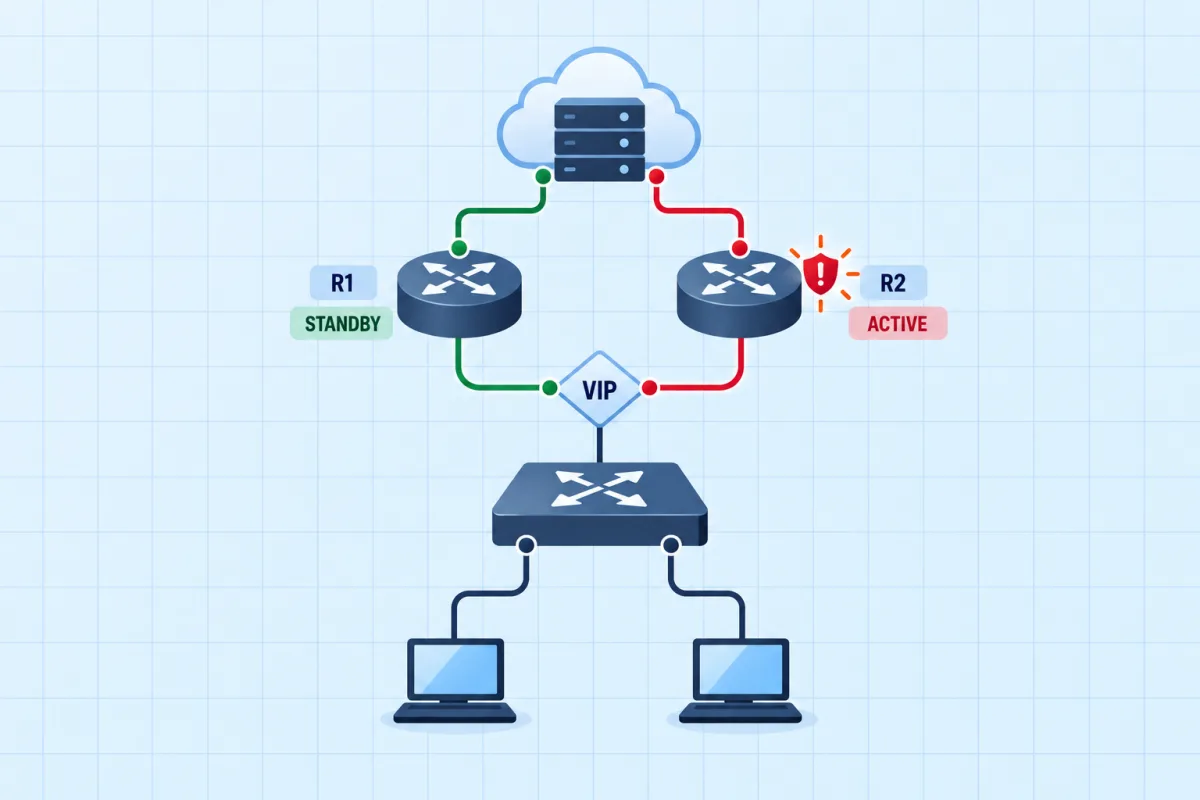
First Hop Redundancy: The Wrong Router Is Active
Two routers share one virtual gateway for the office LAN. Hosts can reach the internet, but the traffic is leaving through the backup router and the uplink it uses is the slow one. Make the intended router active and keep it that way.
Frequently Asked Questions
Why is the wrong HSRP router active?
Almost always one of three things: the router you want Active has the lower priority; it has the higher priority but no standby preempt, so it cannot take over from a router that became Active first; or its interface (or a tracked object) is down, which leaves the group in Init on that router. show standby brief on both routers tells you which.
Does HSRP preempt by default?
No. HSRP preemption is disabled by default, so a higher-priority router that comes up second stays in Standby until you configure standby <group> preempt on it. VRRP is the opposite: preemption is enabled by default.
What is the default HSRP priority?
100, on a scale of 0 to 255. The highest priority wins the election; on a tie, the highest interface IP address wins.
What is the difference between HSRP and VRRP?
HSRP is Cisco-proprietary, uses Active/Standby roles, has preemption off by default, 3-second hellos and a 10-second hold time, and virtual MAC 0000.0c07.acXX (version 1). VRRP is an IETF standard, uses Master/Backup roles, has preemption on by default, 1-second advertisements, virtual MAC 0000.5e00.01XX, and lets the router that owns the virtual IP take priority 255.
What does the HSRP Init state mean?
The group is not running on that interface - usually because the interface is down or the configuration is incomplete. In show standby brief the Active and Standby columns then read "unknown". Bring the interface up (or fix the group configuration) and the router moves through Listen and Speak to Standby or Active.
How does HSRP interface tracking work?
A tracked object - typically the line protocol of the uplink - lowers the router's HSRP priority by a set amount when it goes down, for example standby 1 track 1 decrement 20. With preempt configured on the peer, the peer then takes over, so hosts are not sent to a router whose uplink has failed.
Is HSRP on the CCNP ENCOR exam?
Yes. ENCOR 350-401 v1.2 topic 3.3.c is "Configure first hop redundancy protocols, such as HSRP and VRRP", in the Infrastructure domain (30% of the exam). The verb is configure, so expect to recognise correct configuration and read show output, not just define the protocol.